Scores
A test's page is opened from its name on the Tests tab, or from the dark green bar. It is headed by its teams' full names, as "Australia v New Zealand", with how many matches it is expected to have and what each is the best of beneath. Its scores are the page, with no tabs. A manager and a scorer see the same page, since a scorer can do to a score everything a manager can.
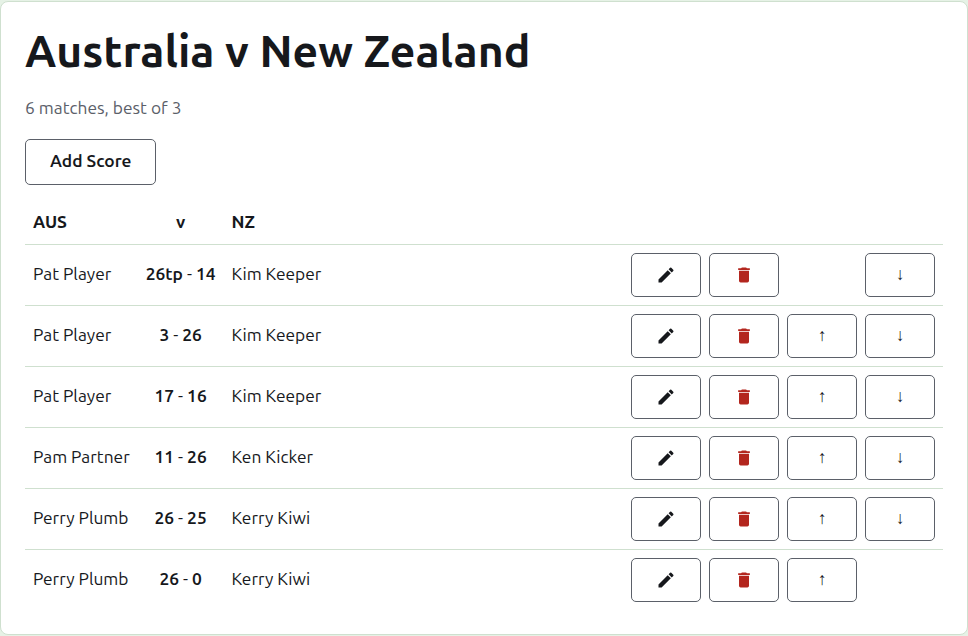
How the scores are set out
The scores are set out by team rather than by who won, in a table headed by the first team's short name, "v", and the second team's. Each score is a row: the first team's player, then both scores with the first team's first, as "26tp - 14", then the second team's player, whoever of them won. The archived scores are set out the same way beneath.
Entering a score
Press Add Score, above the list. The dialog reads as a result is said aloud: the winner and their score, then "beat", then the loser and their score.
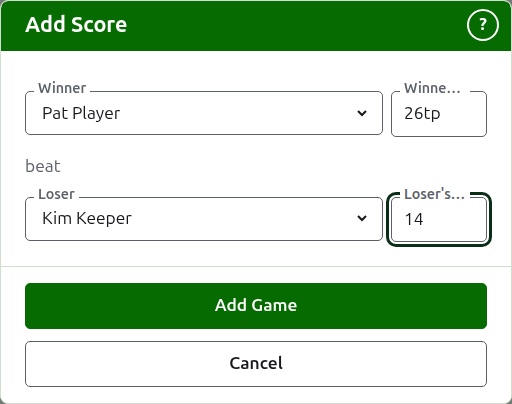
The winner is chosen from both teams' players in use, under each team's name, the first team's players first and each team's in the team's order. Nobody is chosen to begin with. Once the winner is chosen, the loser is offered from the other team alone, since a game between two players of the same team is not a game between the teams. An archived player is not offered.
A score is typed as the scorer wrote it down: its number of points, and whatever follows, which is kept and shown as typed, as "26tp" for 26 hoops and a triple peel. The number is the digits the score begins with; a score that does not begin with a digit is refused.
A game won on equal points, as when it is stopped by time and settled some other way, says who won it by a mark after the winner's score: "6w" beat "6". The marks are "w", "won" and "winner". A winner's score has to be more than the loser's, or marked, unless the tournament allows drawn results, in which case equal points with no mark is kept as a draw.
If the players cannot be read, the dialog says so above the fields, with "The players could not be read. Close this dialog and open it again.", rather than offering nobody. Do as it says.
Press Add Game. The game is added, the dialog says which, and the fields are emptied for the next, since scores come in a batch read off a board at the end of a session. Press Cancel once they are all in.
Matches
Two players who meet play a match of the test's best-of. The games between them are the games of that match, and a game between two players whose match is already decided is refused: one of them has won more games than the other could still win, or every game of it has been played.
A match is started when its two players have a game in use. A test starts no more matches than it is expected to have: once as many have started, a game between two players who have not met is refused, while another game of a match already started is accepted. Where the test is to have more matches, change it on the Tests tab to expect them.
Correcting a score
Edit opens the same dialog on that score, titled Edit Score, with its players chosen and its scores as they were typed. Its players can be changed as well as its scores, chosen as when adding. Press Save to keep the correction and close the dialog. A correction keeps the result: a game won stays won, and a drawn game stays drawn. A game whose result was wrong is archived and entered again.
Putting the scores in order
Scores come in whatever order they are entered, so each score in use offers Up and Down, which swap it with the score next to it, so that the list can be put in the order the games were played.
Archiving a score
Archive sets a score aside so that it counts for nothing. It is listed under Archived scores, struck through, and offers only Restore. Neither asks first, since each undoes the other. Every score in a test can be archived, since a test has no rounds that depend on one another.
A score whose player has been archived since is not restored until the player is, and the page says so.
Next: Notes.